


March Updates
February Updates
January Updates
Remind me of all recent updates from last quarter!
Releases March 25
Advisors often spend hours manually analyzing client data, evaluating strategies, and assembling actionable recommendations, slowing planning cycles and limiting how many clients they can effectively serve.
Imagine a tool that simplifies planning by automatically assessing client data and presenting actionable strategies in real time. With CoPlanner, you’ll spend less time building plans and more time engaging clients, strengthening relationships, and focusing on growth.
CoPlanner marks a major milestone in our mission to increase advisor efficiency by making planning easier and faster, where the platform does more of the heavy lifting so you can focus on relationships, conversations, and meaningful advice.
Why This Matters to You
What’s New
How It Works
Use This When…
You need to go from raw client data to actionable strategies quickly—such as preparing for a review meeting, onboarding a new client, or supporting a mid‑year financial check‑in where timely, data‑backed guidance is essential.
Your Next Steps
Releases March 25
Building a client‑ready plan shouldn’t require jumping between workflows or recreating data. Our newly reimagined Foundational Planning brings everything together to make goals-based planning faster and more efficient.
In our ongoing effort to help you bring planning to more people in less time, holistic goals‑based financial planning is getting much easier. With one streamlined experience, you’ll save time, improve consistency, and deliver plans more efficiently.
This update is also an important step toward our broader vision of a modern, connected planning platform—one that supports goals‑based conversations across all engagement models and turns planning data into a reliable, actionable foundation for advice.
Why This Matters to You
What’s New
How It Works:
Use This When…
You need to build a goals‑based plan quickly—especially for clients who benefit from straightforward retirement, education, or spending analyses. Ideal for annual reviews and initial planning engagements where speed, clarity, and collaboration matter.
Your Next Steps:
Firms that do more planning grow more, earn more revenue, and their clients are more satisfied. These enhancements mark a major step toward improving goals-based, focused conversations to drive time savings, efficiency, and support scalable planning. Foundational Planning is currently available for those with the eMoney Plus and Premier packages.
Releases March 25
⚐ HIGHLY REQUESTED FEATURE
Coming in March, users of the Premium Client Portal will gain access to two highly requested enhancements designed to deliver a more personalized and cohesive client experience:
Customizing your Client Portal allows you to:
Customize these Client Portal features for a look and feel that reflects your brand:
More About Mobile Icon Customization
The stand-out feature of this release is the ability to replace the eMoney logo app to your own logo after a client’s first login, putting your brand directly in your client’s hands.
These modernized Client Portal enhancements give your clients a clearer, more connected experience, further elevating the value you get with the Premium Client Portal.
New Settings Experience: Increase Visibility and Control
All customization included in this update can be controlled from an updated, intuitive Settings page, where you can instantly preview your updates across desktop and mobile—including the app experience—before publishing. Learn more here.
Curious about Premium Client Portal for your business? Explore Premium Client Portal to learn how you can deliver a more personalized, branded experience and strengthen client relationships.
Releases March 25
Managing Client Portal settings client‑by‑client can be time‑consuming and inconsistent. You need a faster, clearer way to activate features, apply standards, and confidently deliver a consistent client experience as your business grows.
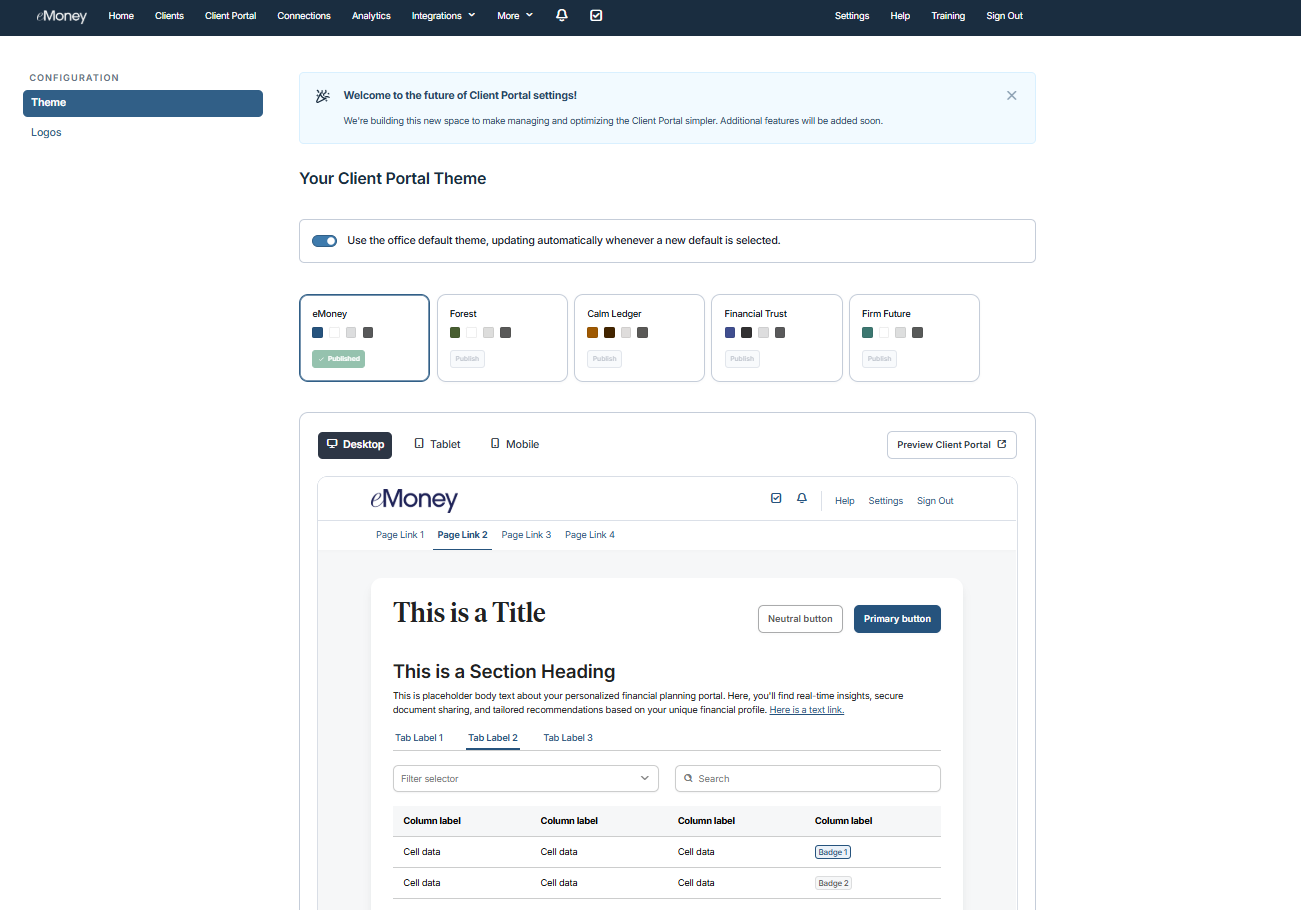
The new Client Portal settings page will bring deeper configuration into one intuitive location, making it easier for you to manage portal features while improving consistency and control. This builds on existing options to manage settings client‑by‑client, for all clients, or as a default via the Globe icon in client settings.
This enhancement supports a broader goal of making the Client Portal easier to manage, activate, and use every day—without adding operational burden.
Why This Matters to You
What’s New
How It Works
Use It When…
You want to standardize the Client Portal experiences across clients while still customizing the look, feel, and features where needed. Centralized settings help you work faster, stay aligned with firm standards, and confidently tailor the experience as client needs evolve.
Put This Feature into Action!
Start using the new Client Portal settings page to publish a new theme, manage your logos, and deliver a more consistent client experience across your book of business. Watch for more exciting Client Portal settings to migrate to this page in future releases.
If you’re a Premium Client Portal user, you also have access to the new Client Portal settings page, which offers even more branding controls to make the portal yours. See what’s new for your experience.
Releases March 25
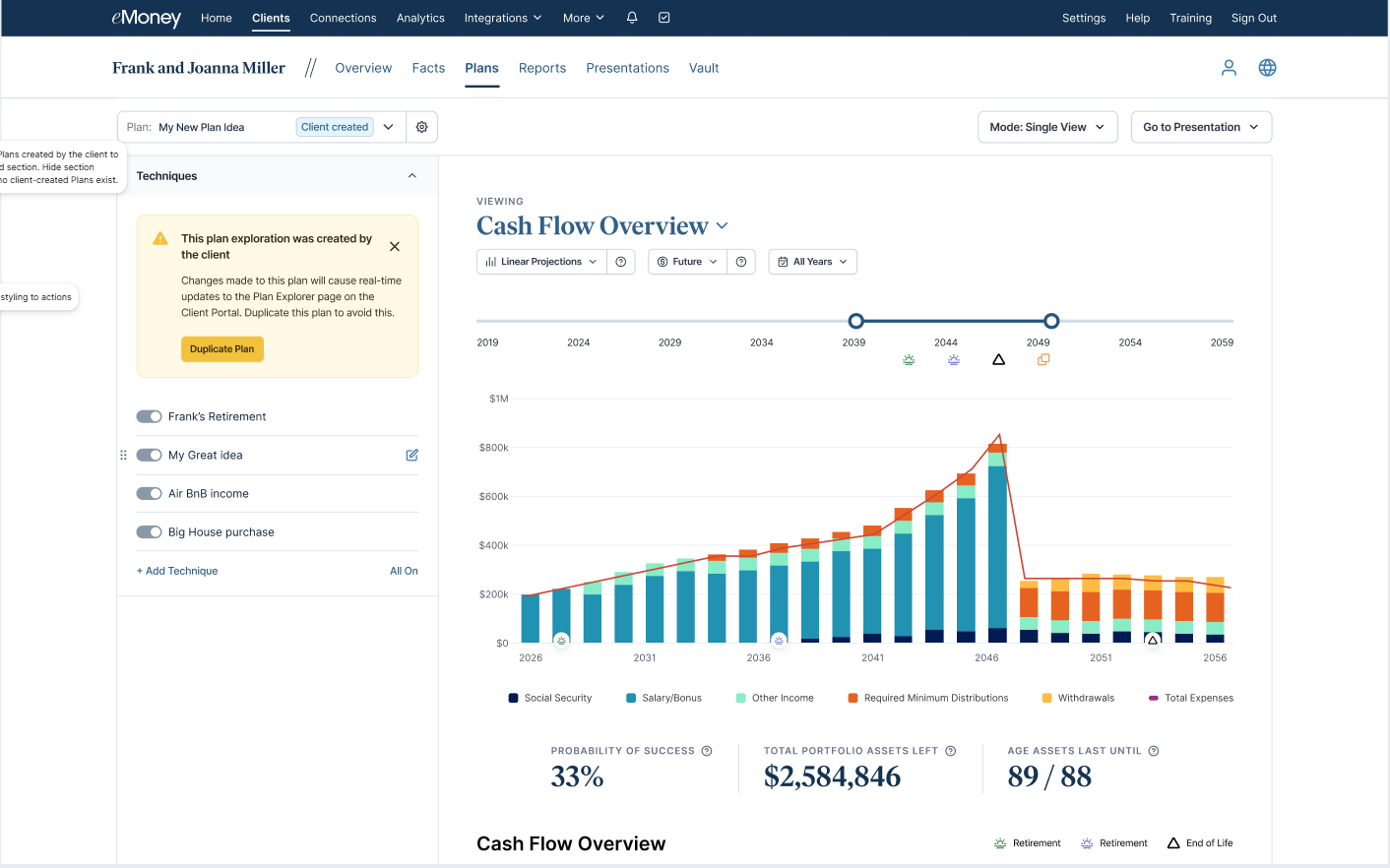
Today’s advisors need quick, consolidated visibility into the assumptions and what‑if scenarios clients explore beyond their base plan. This update delivers that clarity, enabling more efficient and focused conversations.
This update to the Premium Client Portal is part of our vision to help advisors guide smarter, more collaborative planning by empowering their clients to explore scenarios independently, while keeping you fully informed at every step.
Why This Matters to You
What’s New
How It Works
Use This When…
A client wants to explore the impacts of a job change, new savings strategy, or upcoming expense before meeting with you—so you can jump directly into informed recommendations instead of recreating their assumptions.
Put This Feature Into Action!
Let your Premium Client Portal clients know they can now model these adjustments on their own. Before your next meeting, review any new client-created scenarios to streamline the conversation and quickly align on next‑step recommendations.
Curious about Premium Client Portal for your business? Explore Premium Client Portal to learn how you can deliver a more personalized, branded experience and strengthen client relationships.
Releases March 25
Many of the conversations you want to have with clients—whether they’re on track for education goals, if their spending is sustainable, or what legacy they can leave—haven’t always been easy to illustrate. Without clear, goal‑specific insights, it can be challenging to show clients where they stand or how different choices shape their outcomes.
The new Education, Spending, and Leave to Heirs reports in Decision Center change that. These modern, interactive reports bring clarity to education funding, lifestyle spending, and long‑term legacy projections, making it easier for you to open deeper planning conversations and guide clients from exploration into confident decision-making.
This update supports our vision of delivering a more consistent, streamlined planning experience—reducing friction in your workflow, moving faster from insight to action, and delivering more value to every client you serve.
Why This Matters to You
What’s New
Three reports—Education, Spending, and Leave to Heirs—are now available in Decision Center. These reports make it easier to explain funding progress, lifestyle sustainability, and legacy outcomes during client conversations.
How It Works
All three of these reports are in Decision Center now. No additional setup is required.
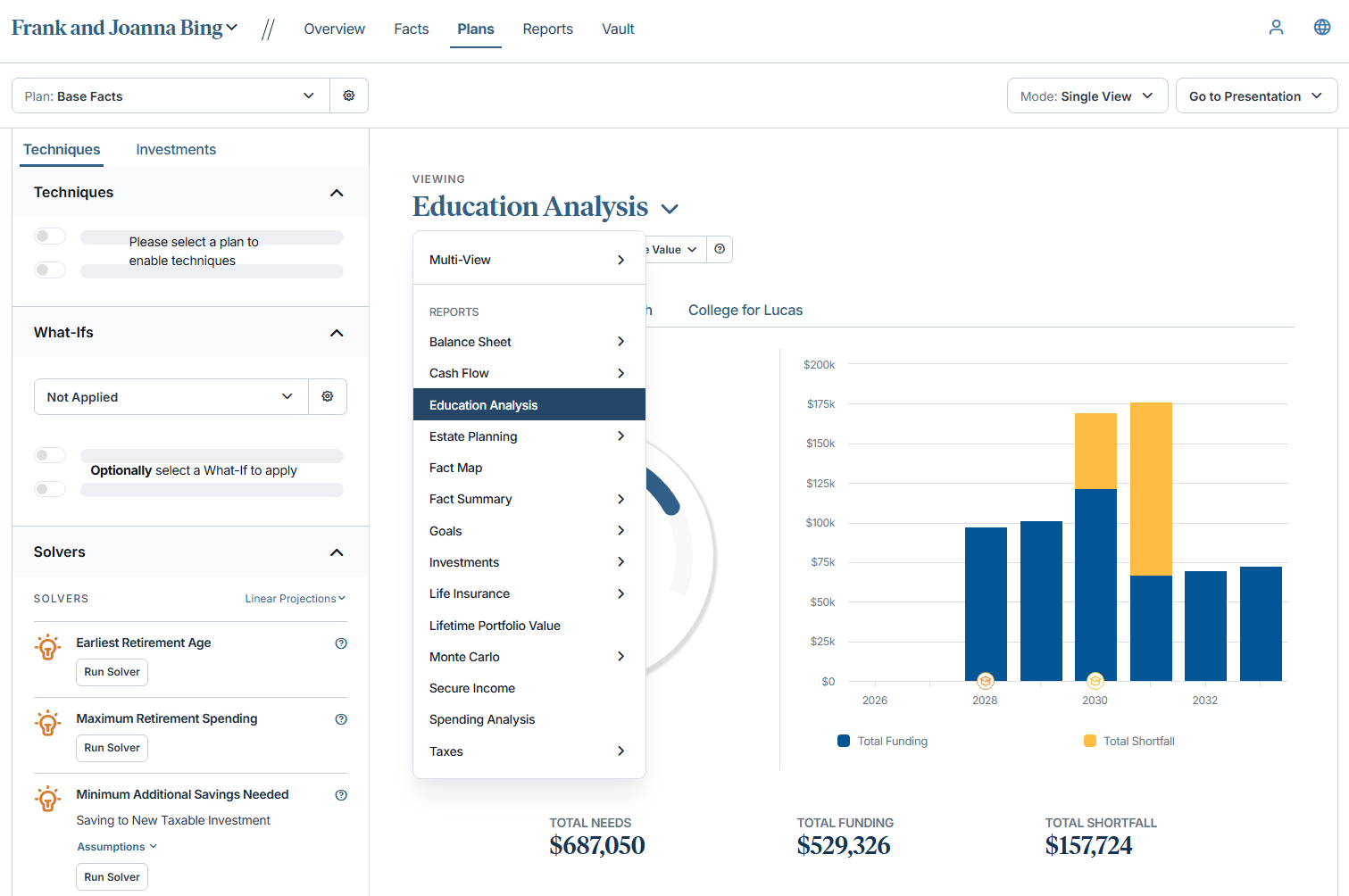
Education Report
Use this report to show projected costs, funding sources, and year‑by‑year coverage for each education goal based on the plan you have selected.
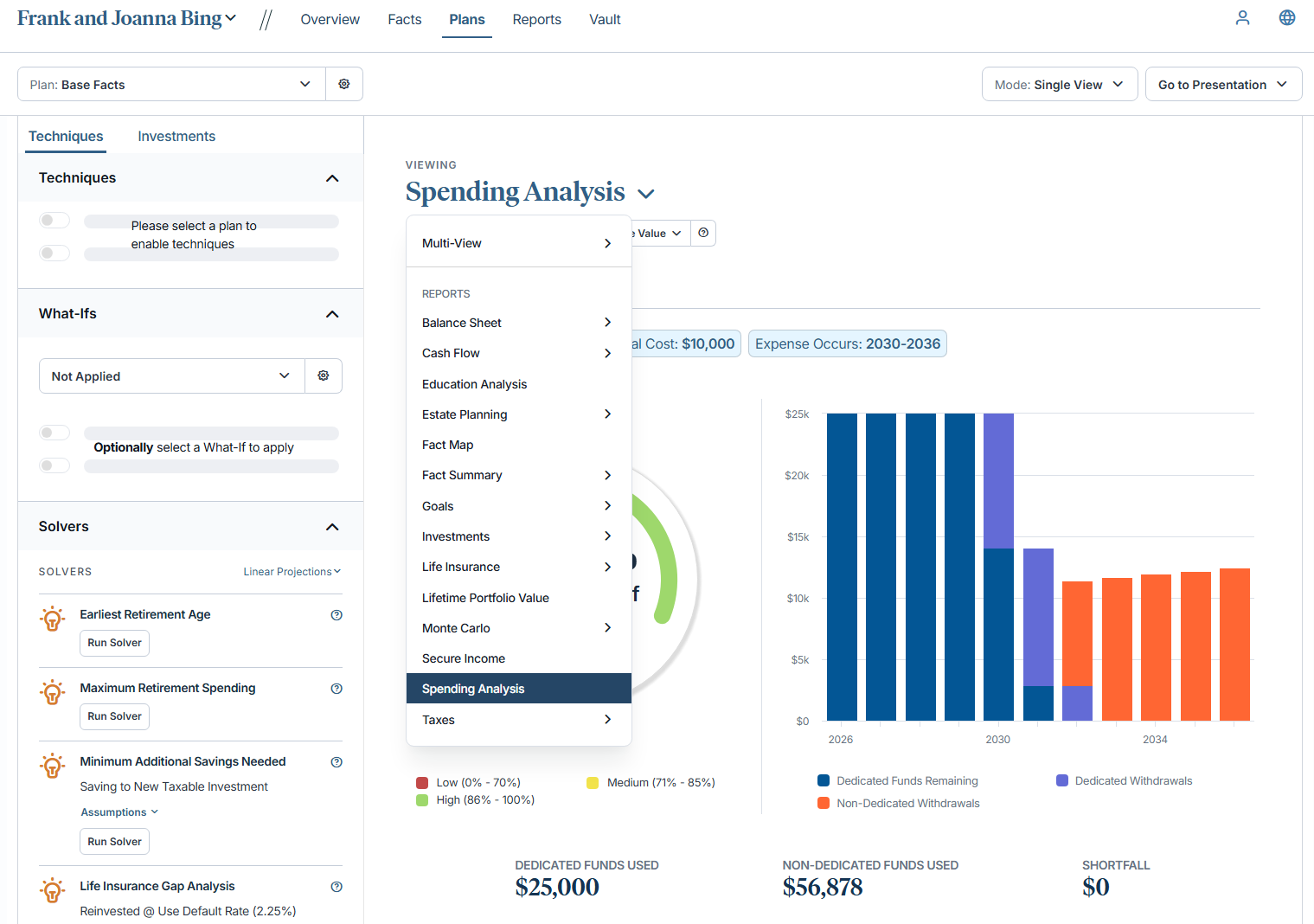
Spending Report
Use this report to reveal how your client’s lifestyle expenses are expected to be funded over time, showing projected spending, available resources, and coverage gaps for each spending goal within the selected plan.
Leave to Heirs Report
Use this report to illustrate your client’s projected estate value and whether their legacy goal will be met, updating automatically based on the plan you have selected.
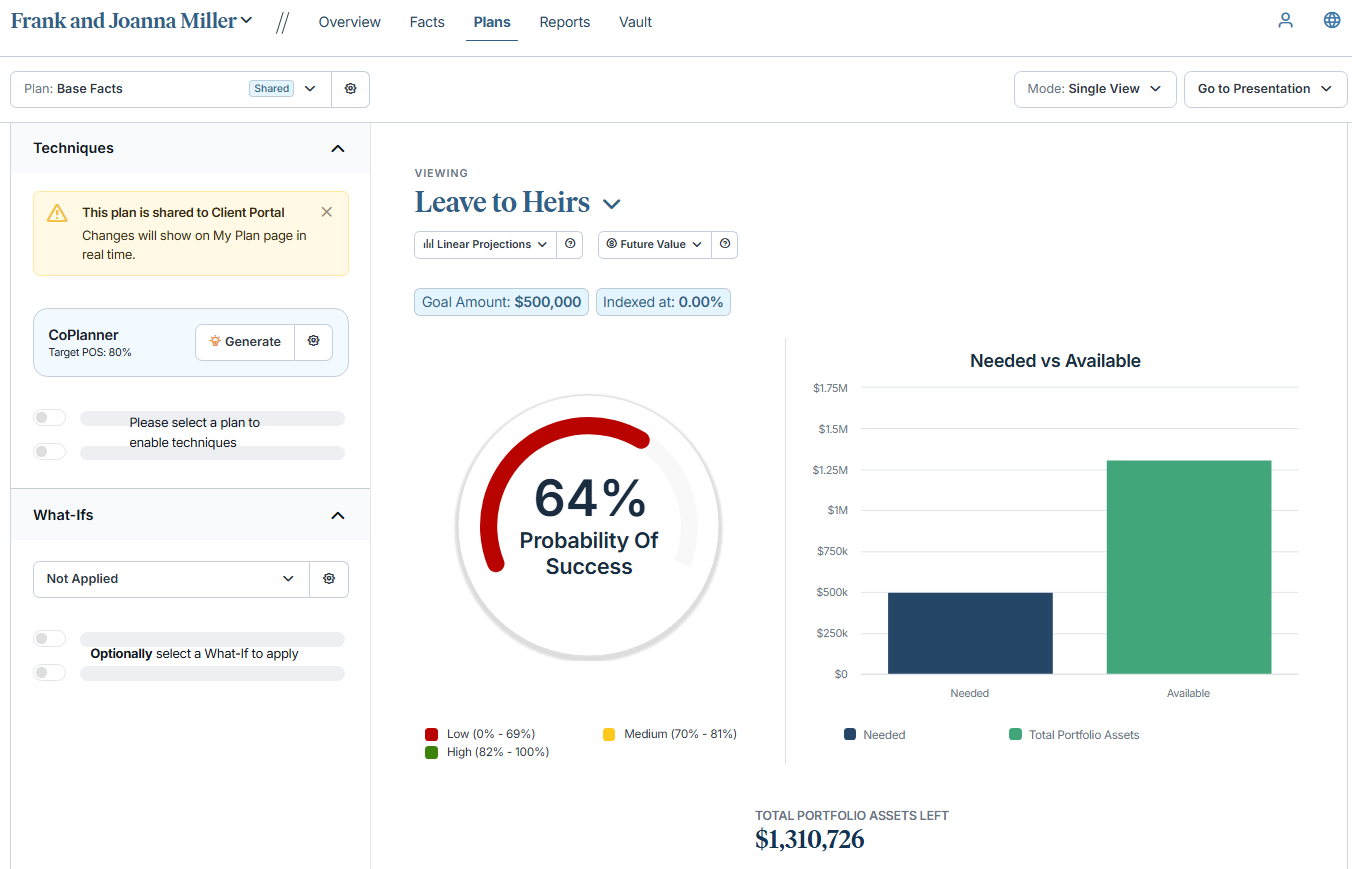
Use this when…
A client asks:
Now you can explore these questions directly in Decision Center using clear, interactive reports designed to support meaningful decision-making.
Get Started
Begin leading more insightful, actionable planning conversations today with the new Education, Spending, and Leave to Heirs reports in Decision Center.
Releases March 25
Clear, client‑friendly reporting is essential for meaningful planning conversations. With this update, the Profile, Income Summary, and Goals reports—previously viewable only in Decision Center—are now available in the Reports tab and under Presentations, making them fully printable and shareable. This gives you a faster, more seamless way to prepare client‑ready documents without extra steps.
This enhancement is part of our broader effort to create a more connected, streamlined planning experience that supports clearer conversations, stronger understanding, and more action‑oriented recommendations.
Why This Matters to You
Quickly build clear, professional reports by bringing core planning insights into a simple, printable, and shareable format.
What’s New
Profile, Income, and Goals reports are now available in the Reports tab and under Presentations, making them printable and shareable for the first time.
How It Works
Continue preparing reports as you always do—simply open Reports or Presentations to add these newly available report types to your client‑ready materials.
Use It When…
You’re preparing for a client review and want to give clients a clear, consolidated view of their personal details, income sources, and goals without switching between tools or rebuilding data. The new printable reports make it simple to assemble a polished, client‑ready packet in minutes.
Get Started
Head to the Reports tab or open Presentations to add the new Profile, Income Summary, and Goals reports to your next review packet to deliver clearer, client‑ready insights.
Releases March 5
As part of our commitment to delivering best-in-class digital experiences, eMoney is modernizing our platform and strengthening our security program in collaboration with Okta, a trusted partner and industry leader in identity management.
To further strengthen protection, eMoney has enabled an enhanced Adaptive Multi-Factor Authentication for all users who login directly, adding an additional layer of security that safeguards confidentiality, integrity, and availability of client information while providing seamless, user-friendly access.
What’s New
How Does AMFA Work?
Each time a user logs in, adaptive MFA dynamically evaluates multiple factors to calculate a risk score and determine whether additional authentication via SMS or phone call is necessary. Factors used in this assessment include device type, geographic location, time of access, network and IP reputation, and historical login patterns. Risk levels (low, medium, high) are configured at the firm level and apply uniformly to all users.
Note: If you and your clients directly sign into eMoney, you may see a login message over the coming weeks about this.
Protecting your and your clients’ data remains our top priority. For any questions, feel free contact us at 888-362-8482 or email customerservice@emoneyadvisor.com.
Coming April 29
⚐ HIGHLY REQUESTED FEATURE
Run onboarding your way by gathering client data first and introducing the Client Portal later, when (or if!) it fits your workflow and client relationships. Standalone Data Gathering arrives April 29.
What’s Coming:
New Client Experience Options:
Client Portal access can be enabled later, allowing you to grow efficiently without forcing a one-size-fits-all client experience. That means less operational friction and more time focused on meaningful client conversations.
Releases February 25
When new accounts open, manually adding and linking them in eMoney can slow down your workflow and lead to gaps in planning data. Enhancements to the Flourish integration automatically add and link Flourish accounts to eMoney Facts, reducing manual work and keeping client information up to date with minimal effort.

Why it matters
What’s new
How it works
Use this when…
You want to ensure client accounts stay up to date automatically—especially for onboarding, recurring planning updates, or keeping plans accurate across engagement models.
Releases February 25
During tax season, advisors often spend too much time tracking down client documents. Accelerate your tax-season workflow by automatically consolidating key forms in one centralized location—no extra steps needed from you or your clients. Now, your clients can instantly access their Schwab tax documents in the Vault as soon as they’re available, alongside their statements.
This enhancement supports our vision of a modern, connected planning platform where reliable data flows automatically across your tech stack, so you can focus more time on planning conversations.

Why it matters
What’s new
Schwab tax forms now sync directly into both the Client Portal Vault and the Advisor Vault, just like Schwab statements.
How it works
If a client already has the Schwab integration enabled, no action is needed. Tax documents will appear automatically when Schwab publishes them.
Use it when…
A client asks, “Do you already have my tax forms?” You can then confirm they’re already in the Vault.
Get started
Enable the Schwab integration for your clients in five minutes or less.
Releases February 28
The Morningstar Office integration will be retired on February 28 and will be removed from the Integrations page. This is due to Morningstar’s decision to discontinue the Morningstar Office platform. Moving forward, users with the Morningstar Advisor Workstation integration enabled can continue accessing similar functionality through that integration.

Releases January 28
Plan Comparison builds on the existing Goal Planner experience to enable deeper, more meaningful plan comparisons in a faster, more intuitive way. See richer information in a single, streamlined view, edit key data, and evaluate multiple options side by side. Clearly surface trade‑offs and outcomes, collaborate with clients in real time, and align on the right path forward—without slowing the planning conversation.
Watch this video walkthrough to see how the new Plan Comparison experience helps you compare plans faster, collaborate more easily, and guide confident client decisions.
With the new Plan Comparison, you can:
Start using Plan Comparison today to save time, strengthen collaboration, and help clients move forward with confidence.
Important Note: Don’t worry, you’ll continue to have access to the classic Goal Planner plan comparison experience via the right-hand toggle through December 2026.
Releases January 28
To ensure a comprehensive, interactive planning experience as part of our ongoing goal of creating a more centralized planning hub in Decision Center, we’ve expanded the report library to include Asset Allocation.
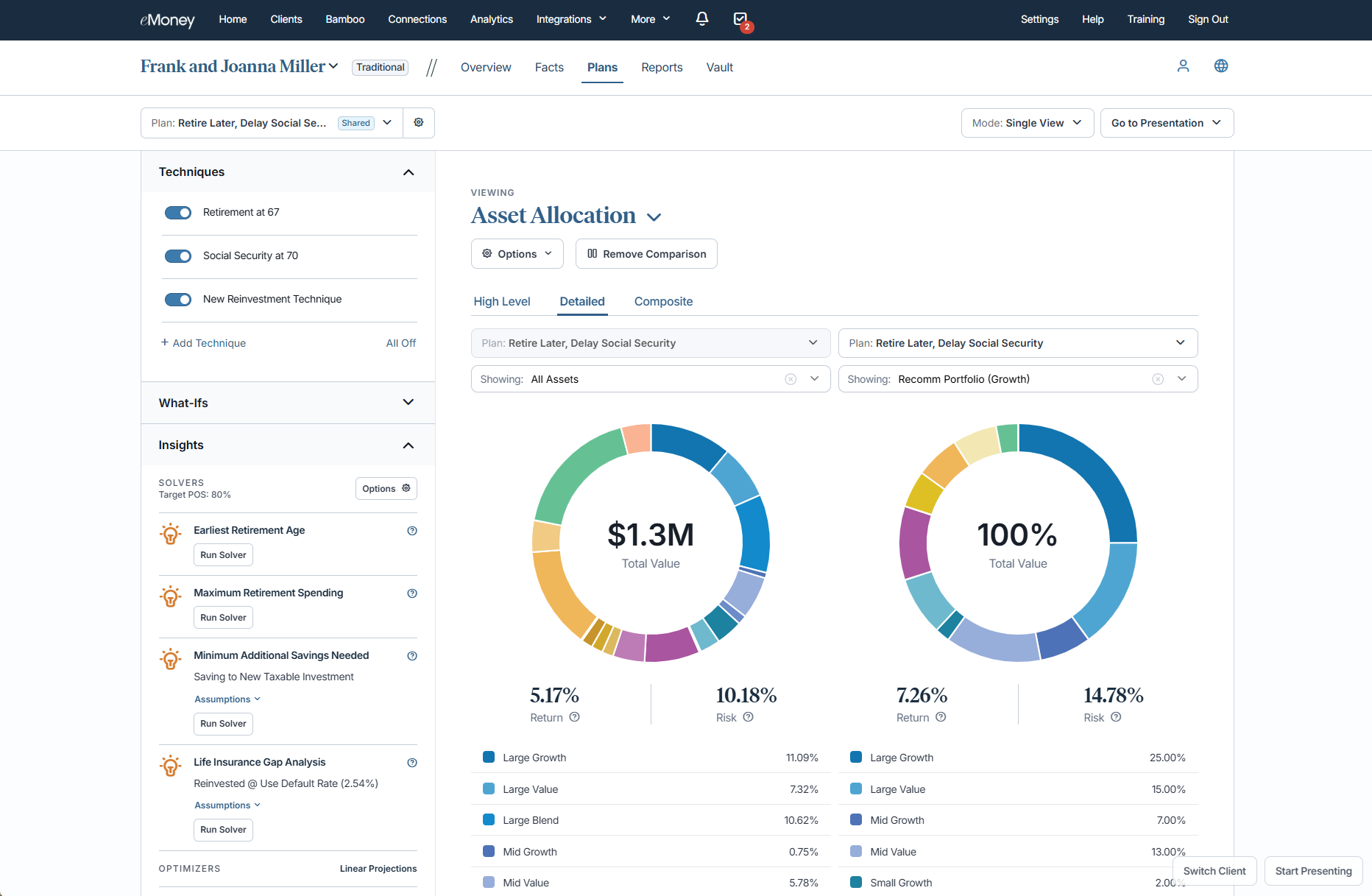
What’s New
We hope this new report helps to streamline your workflows by reducing the need to switch between tools within eMoney, while supporting more collaborative, real-time planning conversations with your clients.
Keep an eye out for more reports coming to Decision Center in 2026!
Releases January 28
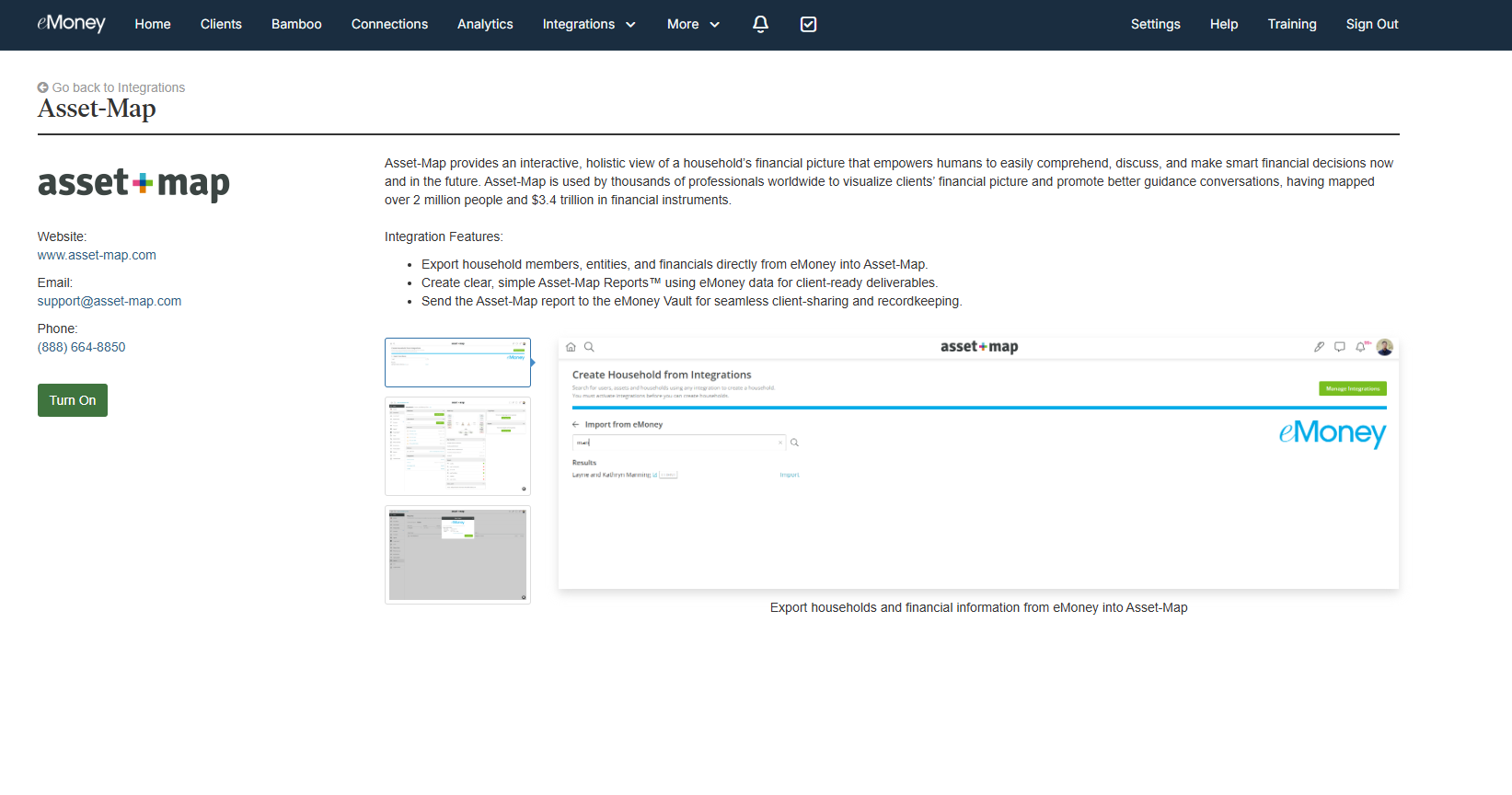
In our ongoing effort to expand our integrations and make it as simple as possible to learn more about them, the Asset-Map integration now has a new support page along with a button to “Turn On” the integration directly.
More About Asset-Map and Why We Chose to Integrate
This integration streamlines advisor workflows by connecting eMoney’s robust financial planning capabilities with Asset-Map’s visual planning capabilities.
We chose to integrate with Asset-Map in direct response to strong customer demand and interest from large enterprise clients.
Integration Features for Asset-Map and eMoney Users