

Over the past year, we’ve focused on making planning more collaborative, flexible, and easier to integrate into how you actually work. With major releases like CoPlanner and a reimagined Foundational Planning experience, we’ve delivered on our commitment to simplify how you engage clients and move planning forward. This month, we’re connecting that progress to what’s ahead—sharing how these innovations fit into a broader vision for more scalable, interactive planning, and offering an early look at where we’re headed next.
Watch how our vision is shaping what’s possible in financial planning.
June Updates
May Updates
April Updates
Remind me of all recent updates from last quarter!
Released June 23
Redeploy Excess Cash and Part-Time Job
When building a plan, it’s not just about finding a solution—it’s about exploring the right strategies for each client’s situation. As client needs become more complex, you need flexibility in how you evaluate trade-offs and opportunities.
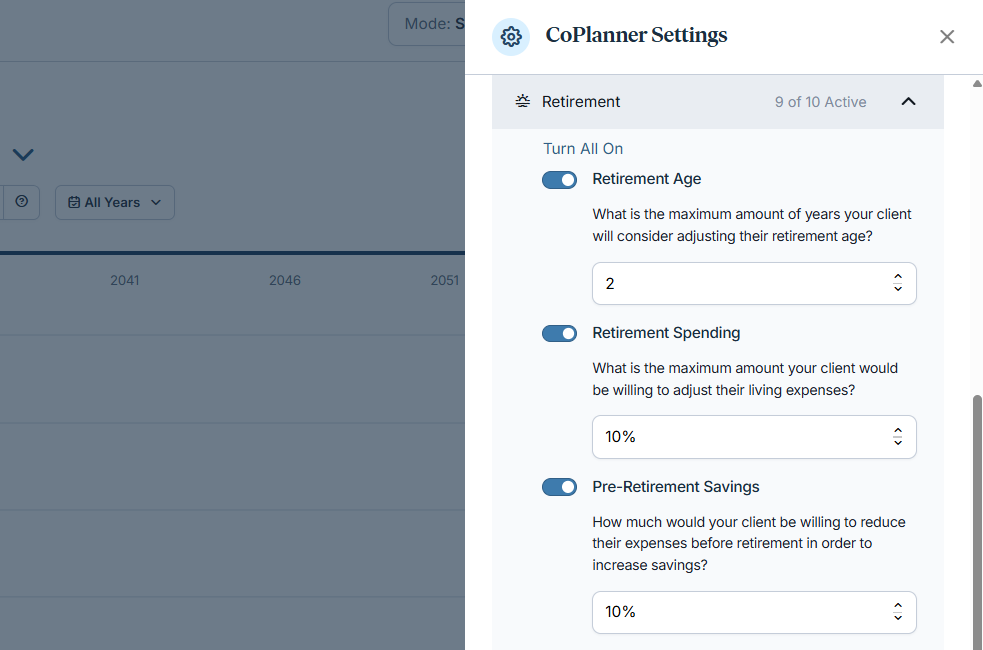
CoPlanner continues to evolve as we expand the range of planning strategies it can evaluate within a plan. As part of this ongoing effort, we’re adding new techniques to the CoPlanner library so it can consider more ways to improve plan outcomes, giving you more flexibility and control over the recommendations it generates.
Why This Matters to You
What’s New
Two new planning techniques are now available in CoPlanner, both configurable in Settings so you can control which strategies are considered:
These techniques build on the growing CoPlanner library—helping it deliver more comprehensive and flexible recommendations over time.
How It Works
Use This When…
Put This Feature into Action
Open CoPlanner Settings and update your advisor default settings to include the new techniques, so they’re automatically applied in future analyses.
Released June 23
When comparing scenarios, it’s not enough to see what’s changed. You need to understand the overall impact.
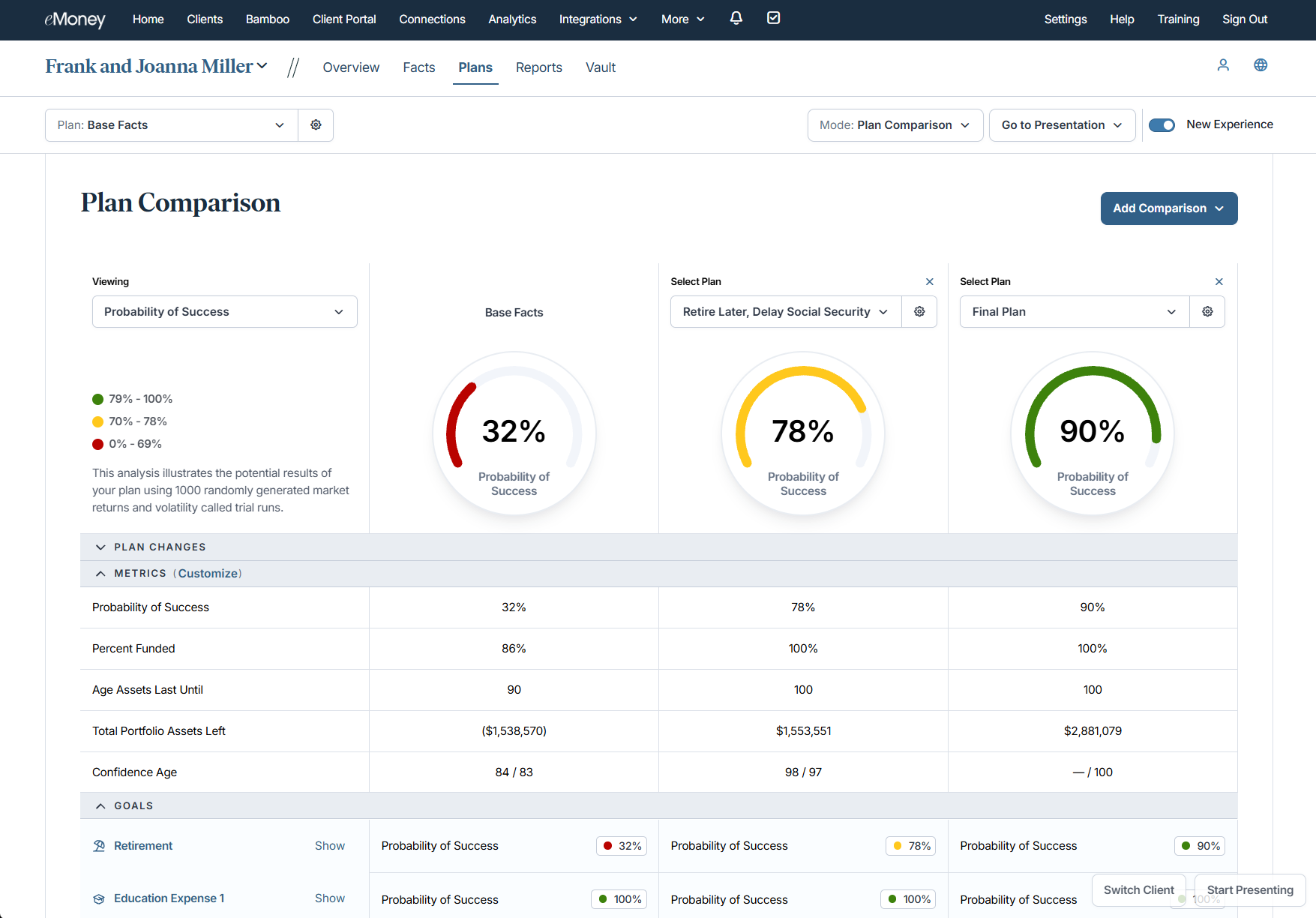
Now, you can view and customize key planning metrics directly within Plan Comparison. This new Metrics section gives you a clearer, side-by-side view of how each plan performs across the outcomes that matter most—bringing critical insights forward so you can stay focused on the conversation, not navigation.
Why This Matters to You
What’s New
You can now view and customize a curated set of planning metrics directly within Plan Comparison—eliminating the need to navigate to reports or other tools to evaluate plan outcomes.
Available metrics include:
If no metrics are selected, a placeholder will appear so you always know what’s being shown.
How It Works
Use This When…
Put This Feature into Action
Open Plan Comparison and expand the Metrics section to guide your next client conversation with clearer, more complete insights.
Plan Comparison is available in Foundational Planning for Plus and Premier users, and in Decision Center for Pro and Premier users.
Sunset Reminder
We plan to sunset the classic Goal Planner experience in Q4 of this year. At that point, all users will move fully to the modern Plan Comparison experience within Decision Center.
Released June 23
Illustrating long-term portfolio outcomes in a clear, visual way can make complex planning conversations easier for clients to understand and act on.
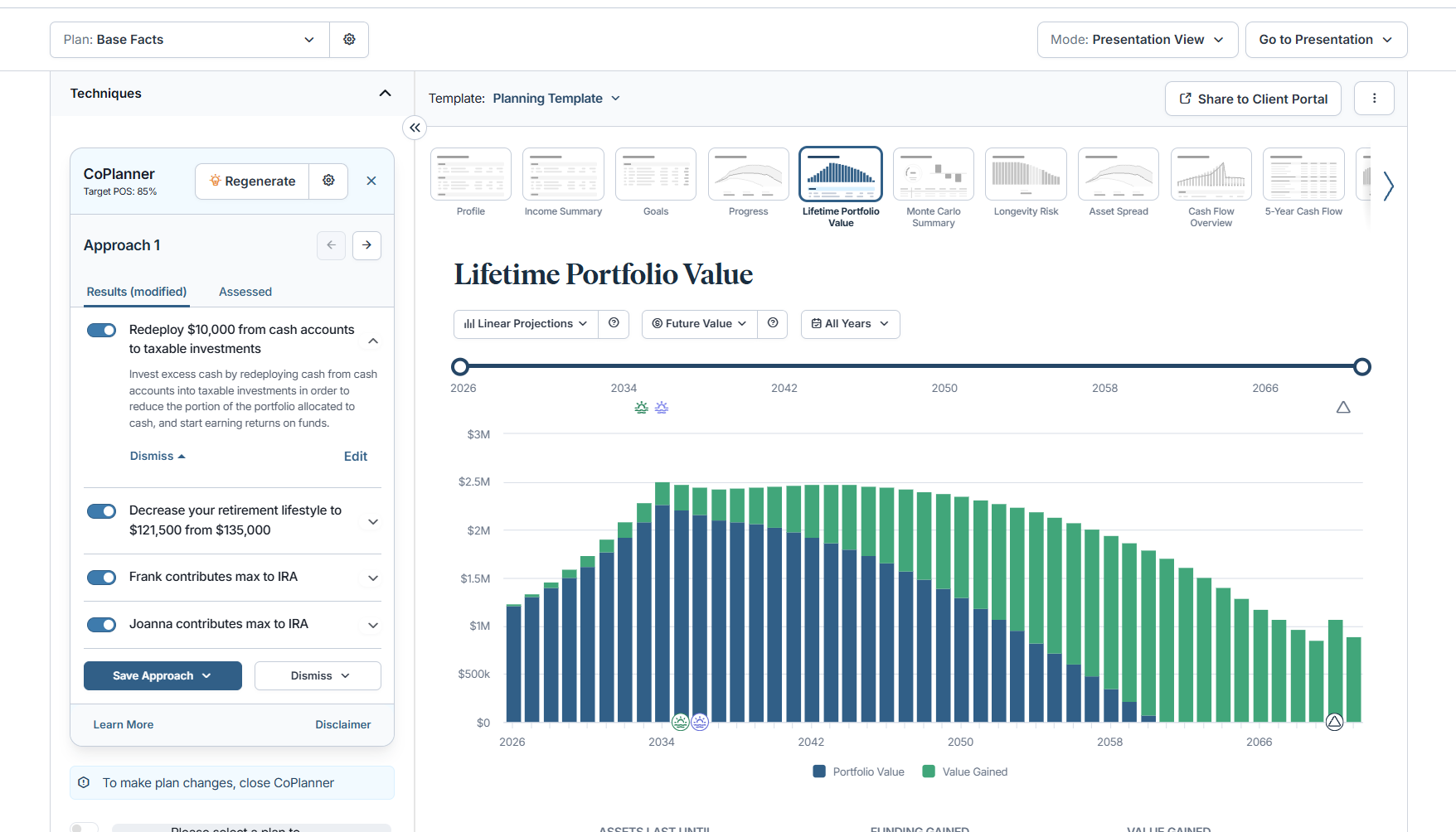
The Lifetime Portfolio Value (LPV) report is one of the most widely used reports in Decision Center for clearly illustrating how a client’s portfolio may evolve over time. With this update, the LPV report is now available for Advanced Planning users to include in presentations and associated deliverables.
Why This Matters to You
What’s New
How It Works
Use This When…
Put This Feature into Action
Use the LPV report in your planning workflows and client presentations to help illustrate long-term outcomes more clearly.
Released June 23
Managing the Client Portal across your client base can require jumping between multiple settings and workflows, making it harder to maintain a consistent experience.
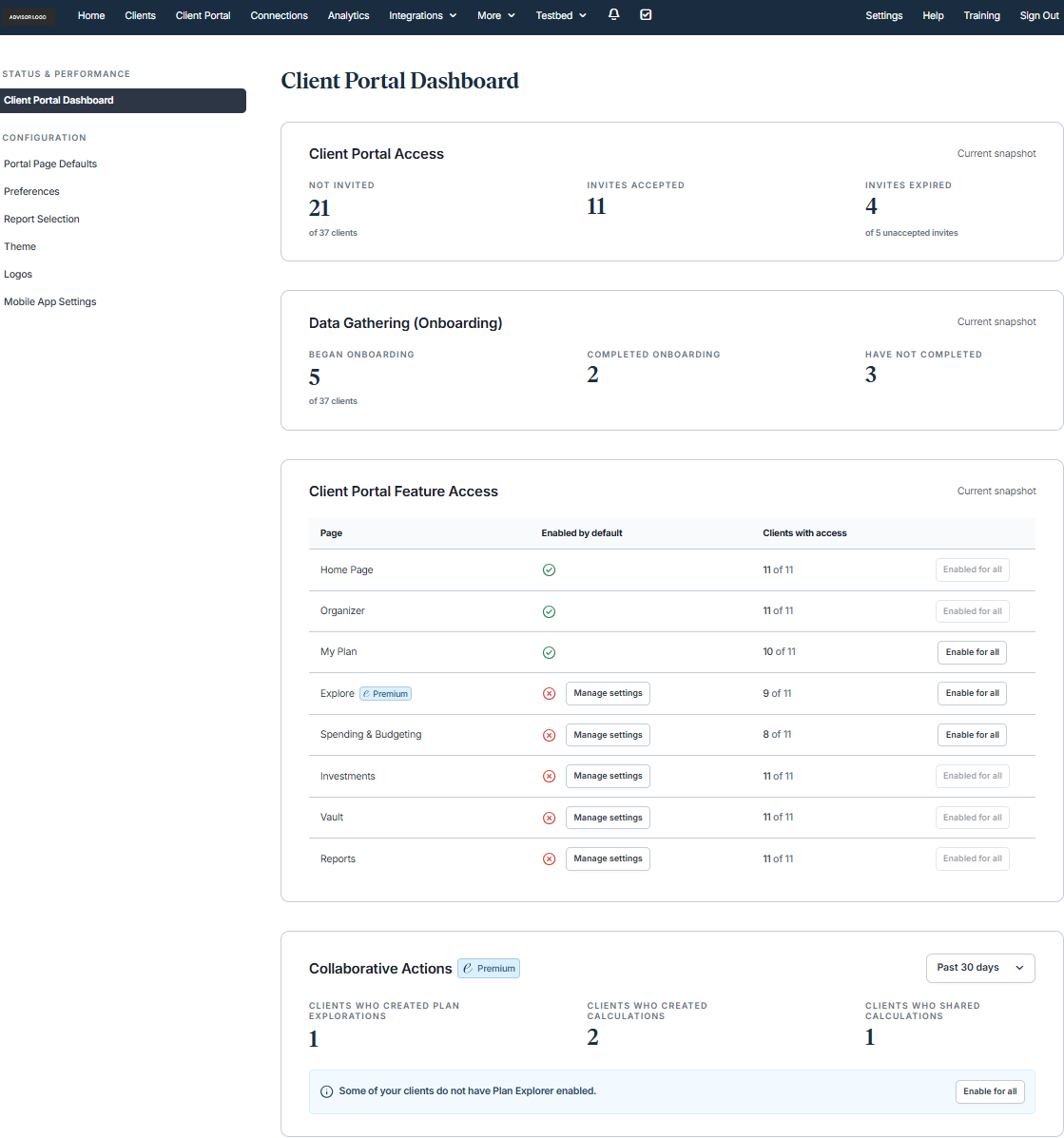
As part of our continued investment in simplifying Client Portal administration, these updates introduce new tools that bring greater control, visibility, and configuration into a single, centralized experience. These updates help you more easily manage defaults, monitor usage, and tailor the Client Portal experience at scale.
Why This Matters to You
What’s New
New pages have been added to the Client Portal tab in Advisor Portal, expanding your ability to manage and monitor the Client Portal experience:
These additions build on existing settings, bringing them together in a more centralized and scalable way.
How It Works
Use This When…
Put This Feature into Action
Visit the Client Portal tab in Advisor Portal to review new dashboard insights and set defaults that align with how you deliver the client experience.
Released June 23
When account and connection relationships aren’t immediately clear, it can slow down how quickly you review client data and understand what needs attention—especially across multiple institutions. It can also make it harder for clients to quickly resolve issues on their own, often leading to additional outreach to advisors.
Clients need a simple, intuitive way to see how their accounts and connections fit together, so they can better understand their financial picture with confidence.
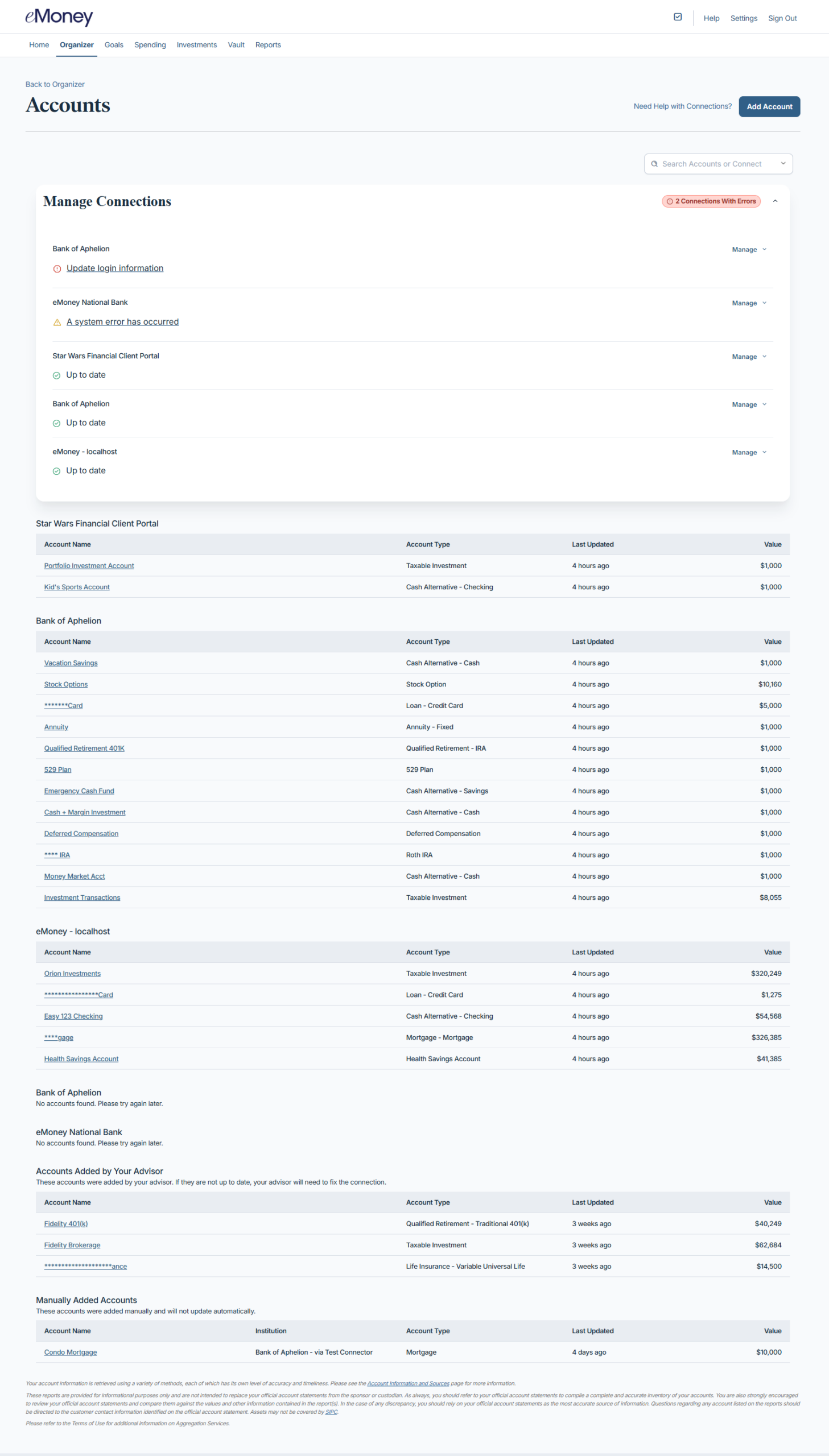
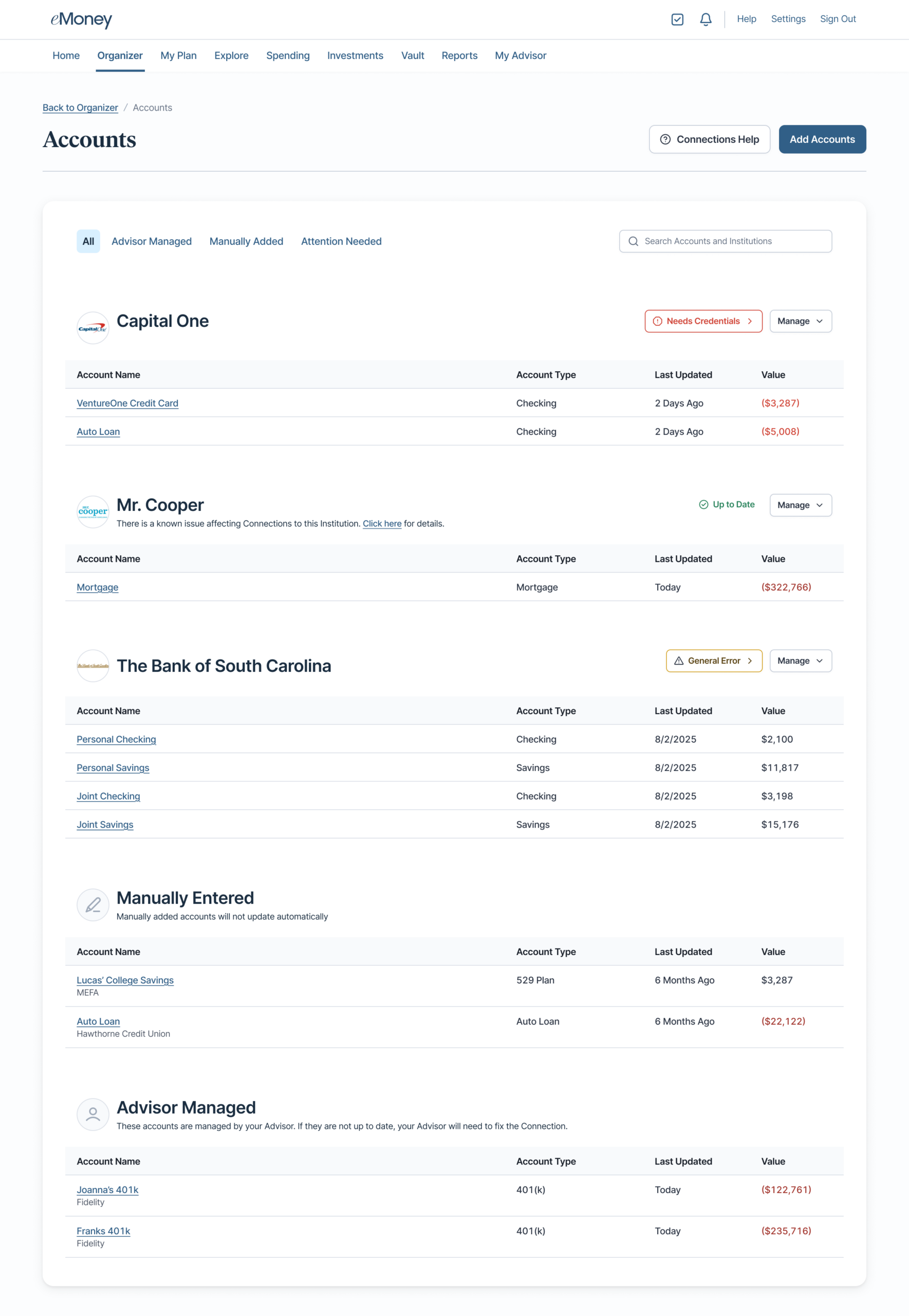
The redesigned Accounts page brings accounts and connections into a single, organized view—making relationships, connection health, and key details easier to scan and understand. This clearer structure helps clients more quickly identify when something needs attention and take action directly within their experience.
This update expands on our vision to deliver a modern, intuitive, and streamlined experience that supports efficient workflows and a more seamless client experience.
Why This Matters to You
What’s New
A refreshed Accounts page groups connections with their associated accounts in a single, intuitive layout, enhanced with institution logos and new filtering options to improve clarity and usability.
Use This When…
You’re working across client accounts and need a simple way to understand how connections and accounts are grouped—especially when reviewing multiple institutions or identifying where attention may be needed. Clients can also use this view to more easily identify and address issues without needing to contact their advisor.
Put This Feature into Action
Open the Accounts page to view connections and accounts together in a single, organized layout, so you can quickly interpret account relationships and move through account management with clarity—while helping clients independently identify and resolve connection issues.
Released June 17
Keeping plans aligned with current market conditions depends on having up-to-date assumptions and reliable projections. When the underlying data changes, it’s important that planning outputs accurately reflect those updates.
Capital market assumptions have been refreshed to incorporate six months of market performance through December 31, 2025. This release also updates the annuitization rate used in projections, improving how income from deferred annuities is estimated.
Why This Matters to You
What’s New
There are no changes to asset class assumptions or projected growth rate methodologies outside of this scheduled update.
How It Works
Use This When…
Put This Feature into Action
Update your capital market assumptions to incorporate the latest data and review any plans that include annuitization to understand the impact of updated income projections.
Additional Context
Released June 25
State tax rules play an important role in estate and legacy planning, particularly when modeling transfers and after-tax outcomes across different jurisdictions.
State estate and inheritance tax assumptions have been updated to reflect the latest available guidance and annual adjustments across multiple states. These updates include changes to exemption thresholds, tax credits, and select state-specific calculation inputs.
Why This Matters to You
What’s New
How It Works
Use This When…
Put This Feature into Action
Review plans that include estate or inheritance tax projections to understand how updated assumptions may impact outcomes.
Delivering intuitive, modern experiences requires continuous focus on the tools and workflows that drive the most value. Maintaining multiple versions of the same functionality can create unnecessary complexity and make it harder to navigate and support the platform.
As part of our ongoing investment in simplifying and modernizing both advisor and client experiences, select legacy workflows will be retired in favor of the enhanced experiences introduced over the past two years.
To help you prepare for these upcoming experience changes, join one of our live training sessions:
August 11, 2026 | 2:00 PM ET
Learn how to transition from the legacy Goal Planning experience to Plan Comparison and get tips for working within the updated workflow.
August 13, 2026 | 2:00 PM ET
Get an overview of the updated Foundational Planning experience and learn what to expect before the transition.
Why This Matters to You
Planning Experience Updates
Over the past two years, enhanced versions of Needs Analysis, Goal Planning (Plan Comparison), and Foundational Planning have been introduced, allowing users to toggle between classic and updated workflows during the transition.
What’s Changing
Effective December 2, 2026
What Remains
Actions to Take
Client Experience Updates
As part of continued investment in the client experience, select legacy workflows will also be retired while newer, more modern experiences are established as the standard.
Client Onboarding
A redesigned onboarding experience is being established as the default client onboarding workflow.
What’s Changing
Why This Matters
Lead Capture
Lead Capture has helped advisors connect with prospective clients and support early financial conversations. As we continue investing in a more modern, end-to-end client experience, we are evolving how prospect engagement is delivered.
What’s Changing
What to Expect
We are introducing a more advanced approach to prospecting that helps advisors attract, qualify, and engage the right clients more effectively.
This new experience will deliver:
Why We’re Making This Change
The current Lead Capture tool has seen limited adoption and no longer reflects advisor needs today. This update creates a stronger, more scalable foundation to support advisor growth.
How to Prepare
Putting It All Together
These updates represent an important step in simplifying the platform and focusing innovation on the experiences advisors and clients use most. By consolidating around modern workflows, we can continue delivering more intuitive, consistent, and scalable planning and client engagement tools.
Released May 28
Many single, divorced, or widowed clients support dependents, and advisors need a consistent way to evaluate their protection needs with the same clarity used for partnered clients.
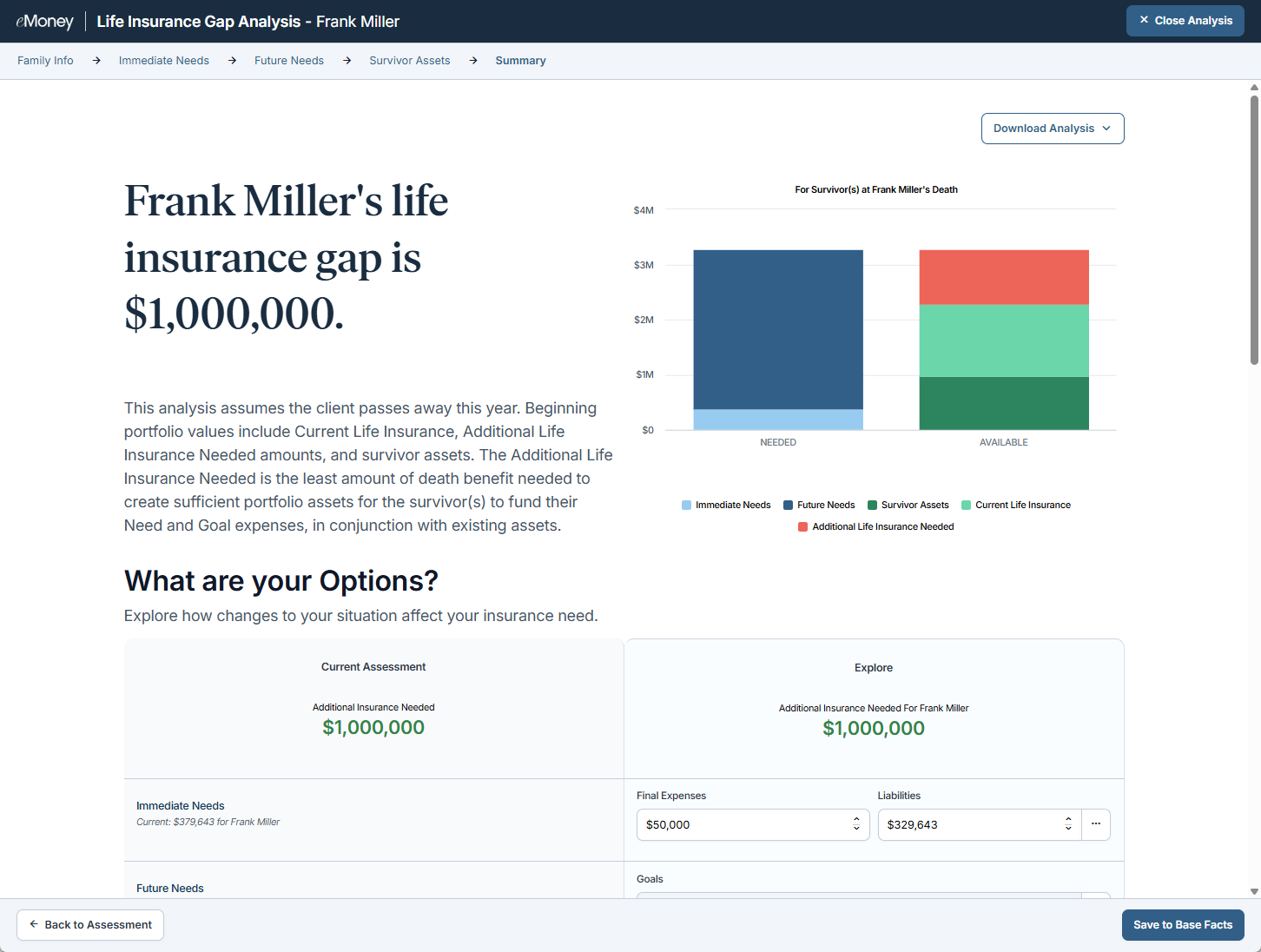
The update to the Life Insurance Gap Analysis enables you to assess coverage needs for single‑status clients with dependents, supporting more accurate protection planning and more relevant conversations across life stages.
This enhancement aligns with our vision of delivering a comprehensive, flexible planning experience that reflects the full range of real‑world family structures, helping you provide guidance that’s better tailored to every client you serve.
Why This Matters to You
What’s New
Life Insurance Gap Analysis now supports single, divorced, and widowed clients who have dependents.
How It Works
There’s no change to your workflow with the updated Life Insurance Gap Analysis for single clients. The module automatically calculates coverage needs using the same methodology you already use for partnered clients.
Use It When…
A single, divorced, or widowed client says, “I want to make sure my kids are taken care of if something happens to me.” Now you can run the same life insurance analysis you rely on for other family structures.
Get Started
Begin evaluating life insurance needs for single-status clients with dependents using the expanded Life Insurance Gap Analysis.
Released May 28
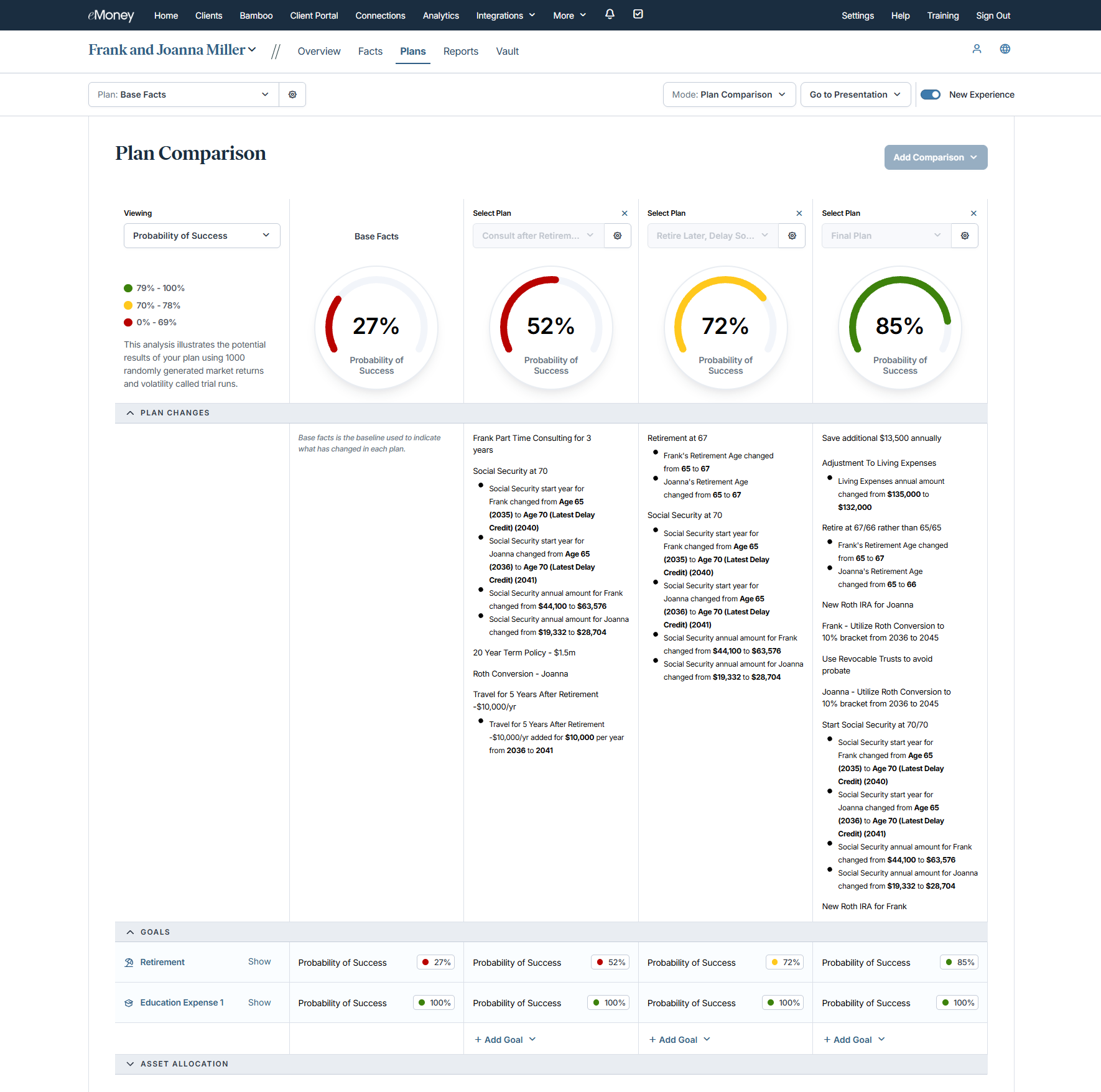
When advisors compare multiple plans, a clear understanding of what changed—and how those changes impact Probability of Success—can disrupt momentum in the planning conversation. You need a way to quickly visualize differences without having to mentally track updates across plans.
This update reflects our vision to help you build meaningful client relationships by reducing friction in analysis, minimizing manual effort, and keeping insight‑driven conversations moving forward.
Why This Matters to You
What’s New
How It Works
Use This When…
Put This Feature into Action
In your next client meeting, start with the Plan Changes section to frame the conversation. Introduce each plan’s key differences clearly, then dive deeper only where it adds value.
Note: As part of our continued evolution of the planning experience, we plan to retire the classic Goal Planner and remove the toggle from the Plans page before the end of 2026. In the meantime, we encourage advisors to begin transitioning to the current planning experience.
Releases May 12
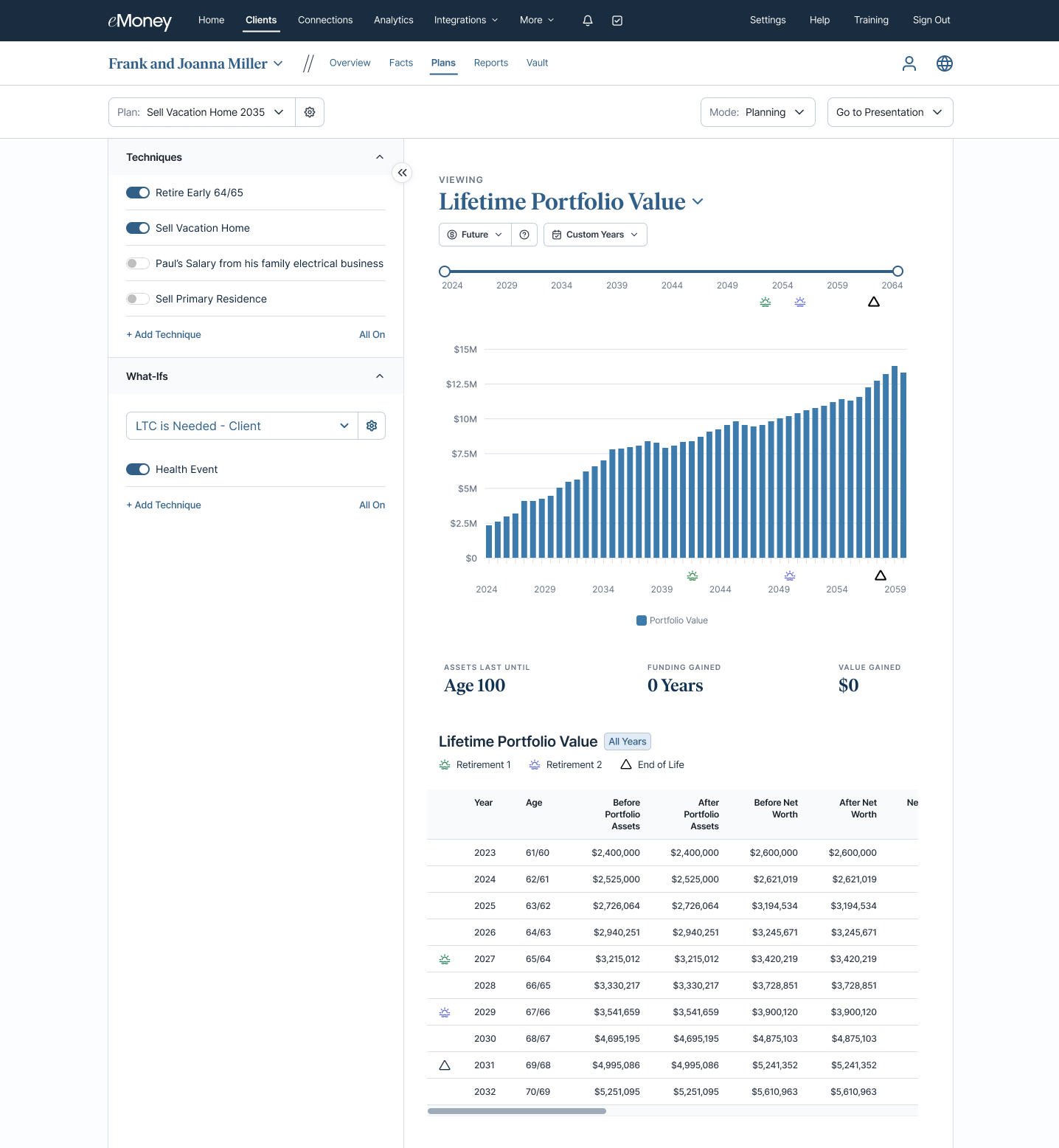
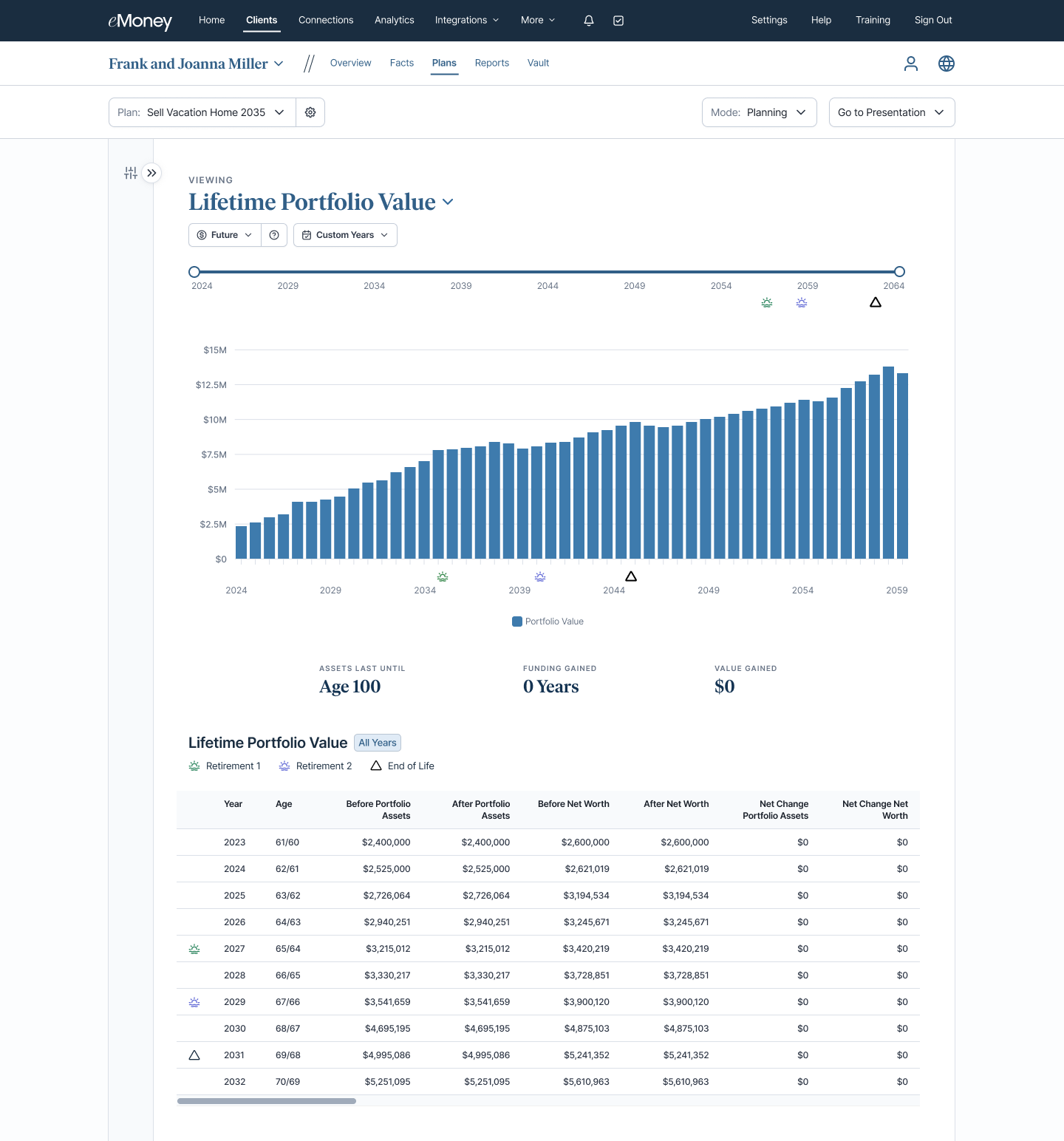
Today’s advisors need clearer, more focused views of interactive reports during client conversations. This update delivers that clarity by giving you more space to spotlight charts and insights, supporting more efficient, confident reviews.
This update to Decision Center reflects our vision to create flexible, intuitive planning experiences that adapt to the conversation you’re having with your client, while delivering a more consistent experience.
Why This Matters to You
What’s New
Decision Center now includes a collapsible left panel, allowing you to dedicate more screen space to interactive reports when needed.
How It Works
Use This When…
You’re walking a client through interactive reports and want the visuals to take center stage, especially during live meetings where clarity and engagement are key.
Put This Feature Into Action
During your next client review, collapse the Technique panel to create a cleaner, more focused presentation experience. When you’re ready to adjust inputs or explore additional techniques, expand the panel instantly, without leaving the report.
Releases May 21
Keep projections aligned with today’s tax landscape. We’ve updated our state income tax assumptions based on the latest guidance and regulatory changes, helping ensure more accurate planning scenarios and client conversations. Additional updates to state estate and inheritance taxes are coming soon—stay tuned for more details.
Releases April 29
⚐ HIGHLY REQUESTED FEATURE
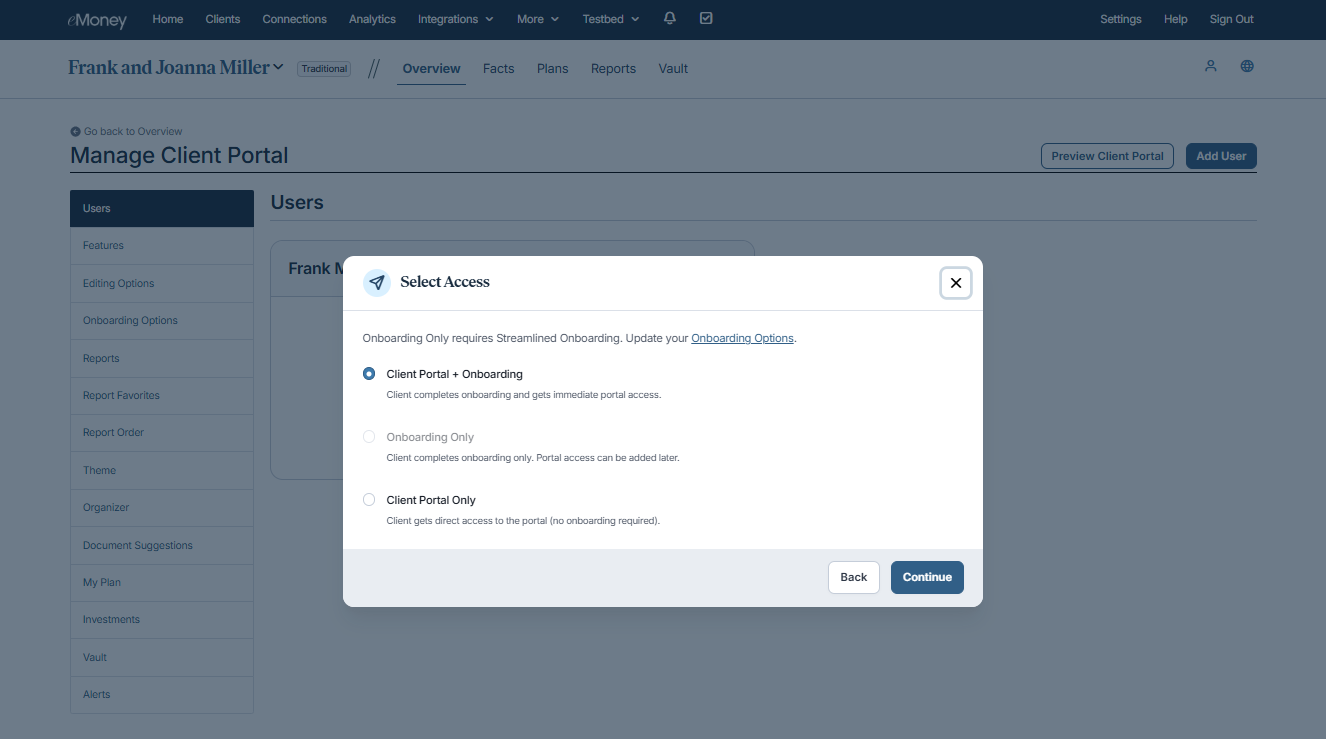
Run onboarding your way by collecting the financial data you need first, without giving clients access to the full Client Portal before it fits your relationship or workflow. By introducing a natural pause between data collection and plan delivery, you have time to review, validate, and build recommendations before clients see results, supporting a more intentional, confidence‑driven planning experience.
This update reflects our vision to help advisors create more space to build meaningful client relationships, reduce manual work, and serve more clients in less time.
Why This Matters to You
What’s New
You can now gather financial data without immediately granting Client Portal access, creating a more flexible onboarding experience that fits your workflow and client relationships.
How It Works
Use This When…
You want to gather financial data without immediately exposing clients to plan results, such as during an initial planning engagement. It also fits naturally into ongoing workflows like annual reviews, where clients can update information while you maintain control over timing, review, and plan delivery.
Put This Feature Into Action!
For your next new planning client, select Onboarding Only to gather data without portal access, then enable the Client Portal once recommendations are ready to share.
Releases April 29
When onboarding multiple clients, manual client creation can slow down workflows and delay meaningful planning work. Even small setup tasks add up at scale. Bulk Client Upload removes that friction by allowing advisors to create multiple client profiles at once, streamlining the process for both new and existing practices.
This update supports our mission to make day‑to‑day work more efficient and less time‑consuming by streamlining onboarding so you can grow your business without added operational overhead.
Why This Matters to You
What’s New
Instead of adding clients one by one, you can now upload a CSV file with up to 1,000 clients, then review and approve them before they’re added to your client list.
How It Works
Use This When…
You’re adding a group of new clients, whether you’re a new firm getting started or growing an existing practice, so you can build client profiles all at once instead of entering each client manually.
Put This Feature into Action!
The next time you add clients, choose Import from CSV to streamline onboarding and get your firm up and running faster.
Releases April 29
When you’re helping clients evaluate guaranteed income, small differences in assumptions can have a meaningful impact on how a strategy plays out over the course of their retirement. That’s why you need annuitization projections that mirror how today’s annuity products are priced, structured, and used in real retirement income planning. Updated assumptions help ensure projections reflect current market conditions and modern longevity trends.
This update is part of our ongoing effort to ensure the assumptions and data used in eMoney align with current industry standards, regulations, and how planning is actually done today.
Why This Matters to You
What’s New
Use This When…
You’re showing a client how much income an annuity might provide in retirement. For example, when helping a client nearing retirement understand what their deferred annuity could pay out, these updated assumptions give you a more realistic estimate based on today’s fees, life expectancy, and longer‑term investment environment.
Clear advice depends on seeing the whole picture without gaps, guesswork, or downtime—and maintaining that clarity should scale as client complexity grows. Throughout 2025, eMoney aggregation continued to scale with that goal in mind, expanding coverage while strengthening direct connections that support a consistent, up‑to‑date view of client finances. Here are the highlights.
Together, the investments made in 2025 lay the foundation for continued aggregation expansion, helping you maintain a clear, reliable view of client finances as they grow in complexity and scale into 2026.