for expert insights on the most pressing topics financial professionals are facing today.
Learn MoreWith a password needed to login to virtually everything, it’s possible that you’ll run into a few hiccups logging into your eMoney application. Fear not! This week’s tip centers on basic login and password issues, including:
Here are some tips to help your logon frustrations:
After three consecutive failed logon attempts, you will be locked out of our system for 15 minutes. After those 15 minutes, your account automatically unlocks and you can give it another shot. If you are ever locked out and you are unable to wait the 15 minutes, the best thing to do is call Customer Service at (888) 362-8482 and we will happily unlock your account.
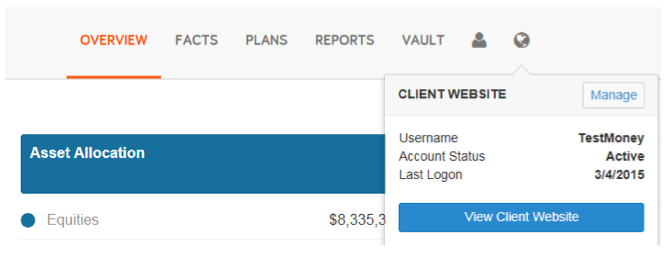
However, if a client is locked out, the only way to unlock their account within the 15-minute lock-out is to reset the client’s password via the Manage Client’s Website tool as shown below.
Client and advisor passwords often expire for security purposes. Client passwords automatically expire after one year on the Client Website or if their password has been reset and they’re operating under a temporary password. While clients may use one password for a full year, advisors, assistants, and planners must reset their passwords every 60 days.
Resetting a client’s password is easy! From the Client Overview, click the globe icon and select “Manage.” Here, you will want to click the “Reset Password” link – this will prompt you to manually reset your client’s password to a temporary one. The password will be emailed to them upon reset. It is important to note that Customer Service cannot reset a client’s password on your behalf, but we are more than happy to walk you through it!